Route records to those Assignees that are best equipped to handle them, by assigning based on their particular user skills.
Record the specific skills of your users, and route records to them based on what they can do best. For example, add skill ‘Spanish’ to your Spanish-speaking users, and set up an AssigneeRule + MatchRule to route records with Spanish content to them.
Configuring Skills
To set up skills for your users:
- In Plauti Assign, go to Assign Setup > User Skills.
- At top right, click New.
- At User, find the user you want to award a skill to.
- At Skill,
- Enter the name of an existing skill and select the skill from the list of suggestions. Or
- Click New Plauti Assign Skill in the search results, enter a name for the skill, and click Save.
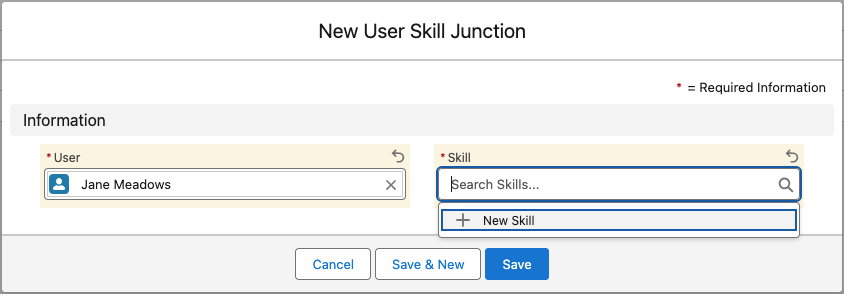
- Click Save.
- Repeat to award more skills to the user.
The skill has been linked to the user. You can now route records to this user based on the skills you just added.
Routing based on Skills
To route records based on Assignees' skill sets:
- Go to the Match Group you want to use for routing records based on skills, or create a new Match Group for this purpose.
- On tab Dynamic Assignees, in the Dynamic Assignee Rules section, click Configure.
- Click Add to add a new Assignee Rule.
- At ‘Type’, select Skill.
- At ‘Field’, select Name.
- At ‘Operator’, select an operator to find the skill name by. Toggle ‘Not’ if you need to invert the operator.
- At ‘Value’, enter a value to find the skill name by, usually the skill name itself.
- Click Save.
The skill-based Assignee Rule will now appear in the Assignee Rules section. Configure more Assignee Rules if needed.
- Click Apply Rules and Settings to apply the new Assignee Rule.
- On tab Assignees, verify that the users you expect to be found, based on the newly added skill-based rule, are indeed found by the Assignee Rule.
- Add one or more Match Rules to the Match Group that will match records that meet the skills you configured, such as Leads from Spanish-speaking regions.
The Match Group will now route records that match the skills to the applicable Assignees.
Finding all Skills of a User
To see which skills are awarded to a certain user:
- In Plauti Assign, go to Assign Setup > User Skills.
The User Skills Overview appears. - Sort the list view by User.
Each instance of the user and their skills are now displayed grouped together.