Route new Leads to qualification teams, then reassign qualified Leads to specialist sales teams, e.g. by territory or Lead Type.
Many sales organizations use different teams for different stages of the lead journey. New Leads go to a qualification team that contacts the prospect and enters the qualifying information on the Lead record. Once that information is entered, the Lead must be reassigned to the sales team responsible for the next stage. Plauti Assign automates the assignment at both stages: Match Groups decide which team gets the Lead at each stage, and a Flow sends the qualified Lead back to Plauti Assign for reassignment.
Example scenario
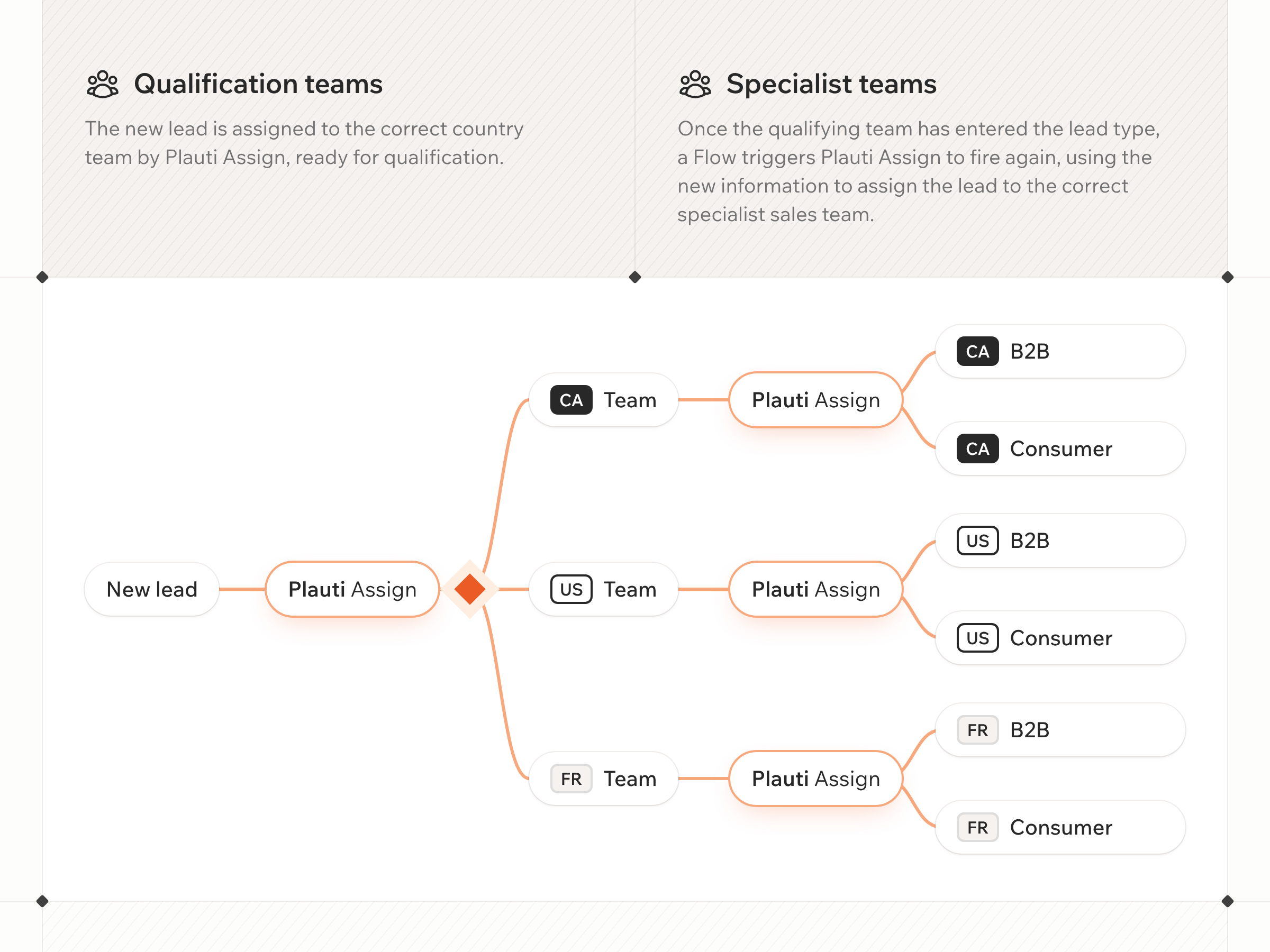
This article uses the following multi-stage Lead process as an example:
- Leads come in through the website from Canada (CA), the United States (US) and France (FR). A qualification team that speaks the right language qualifies them first.
- The qualification team splits the Leads into
ConsumerandB2BLeads, and enters this in a custom Lead Type field (Lead_Type__c). - Once the Lead Type is entered, the Lead is reassigned to a specialist sales team for the right territory and Lead Type, which works the Lead and closes the sale.
This gives two tiers of sales teams (qualification and closing), across three territories and two specialties (B2B and Consumer):
Prerequisites
- The Lead object is configured in Plauti Assign.
- The Lead object has a custom Lead Type field (
Lead_Type__c) that the qualification team fills in. - You have permission to create and activate Flows in Salesforce.
1. Create the Match Groups for the qualification teams
The qualification Match Groups assign new Leads to qualification reps who speak the right language. Create one Match Group per territory:
| Match Group | Match Rule | Priority |
|---|---|---|
| CA Qualification | Country Equals CA |
2 |
| US Qualification | Country Equals US |
2 |
| FR Qualification | Country Equals FR |
2 |
Add the reps who speak the right language(s) as Assignees of each Match Group. You can use language-based Skills to add the right reps to the right Match Group automatically.
The Priority of 2 makes sure that Plauti Assign checks the Match Groups for qualified Leads (Priority 1) later on first.
Read more about the order in which Match Groups are evaluated in MatchGroups: Priority and Overflow.
These Match Groups will ensure new leads are assigned to the qualifiers that speak the right language. When these reps contact the lead and find out whether they are Consumer or B2B, they will update a custom Lead_Type__c field.
2. Create the Match Groups for the specialist sales teams
The specialist Match Groups assign already qualified Leads to the sales team for the right territory and Lead Type. Create six Match Groups, one for each combination of territory and Lead Type, and set their Priority to 1.
Each Match Group has two Match Rules: one for the territory and one for the Lead Type. For example, the Match Group for the Canadian B2B specialists has these Match Rules:
- Country Equals
CA - Lead Type (
Lead_Type__c) EqualsB2B
And Priority set to 1.
A new Lead has no Lead Type yet, so it does not match these Match Groups. Instead, Plauti Assign assigns it through the qualification Match Groups with Priority 2.
3. Create a Flow that reassigns qualified Leads
After the first assignment, the Use Plauti Assign field (leadassist__Use_Round_Robin__c) of the Lead shows ASSIGNED, and Plauti Assign does not process the Lead again by itself. A Before Save Flow sets Use Plauti Assign back to TRUE when the qualification team enters the Lead Type, so that Plauti Assign reassigns the Lead.
Create a record-triggered Flow on the Lead object that runs when a record is updated and that is optimized for Fast Field Updates (Before Save Flow). Use these entry conditions, with All Conditions Are Met (AND):
| Field | Operator | Value |
|---|---|---|
Use Plauti Assign (leadassist__Use_Round_Robin__c) |
Equals | ASSIGNED |
Lead Type (Lead_Type__c) |
Is Changed | True |
Lead Type (Lead_Type__c) |
Is Null | False |
Then add an Assignment element that sets {!$Record.leadassist__Use_Round_Robin__c} , which is the record's 'Use Plauti Assign' field, to TRUE, and save and activate the Flow.
For the full steps, and for which other 'Use Plauti Assign' values you may want to include, see Reassigning Records with a Flow.
How the reassignment works
An incoming Lead, which does not yet have a Lead Type, is evaluated by Plauti Assign. First the Priority 1 Match Groups are tried, but these all require a Lead Type. So the Lead is then evaluated by the Priority 2 Match Groups and matched to an Assignee of the qualification team. When a qualification rep enters the Lead Type and saves the Lead, the Flow sets 'Use Plauti Assign' to TRUE. Plauti Assign then re-evaluates the Lead, starting again with the Priority 1 Match Groups. Now it does match, and the Lead is reassigned according to its Country and Lead Type.
To check the setup, update the Lead Type of a test Lead that was already assigned to a qualification team. The Lead owner should change to an Assignee of the matching specialist Match Group, and Use Plauti Assign should show ASSIGNED again. If it shows NOMATCH, check the Match Log.